The No-Jargon Guide to AI-Powered Document Processing

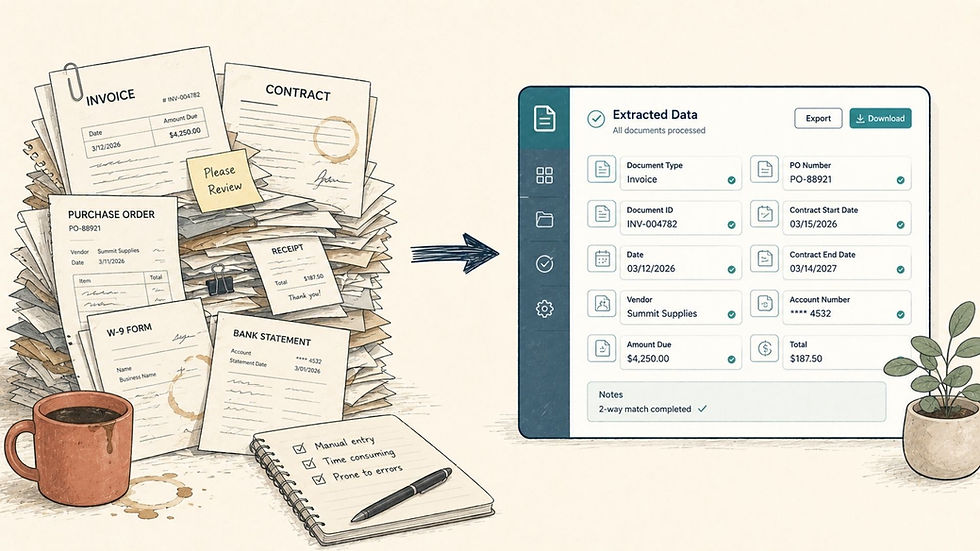
Every business has a document problem. The specifics change from one company to the next invoices, contracts, loan applications, compliance filings, medical records, insurance claims but the core problem is universal. Humans manually reading, extracting, and re-keying data from documents is slow, expensive, and error-prone. And the cost is rarely visible on a single line of a budget; it is spread thinly across every department that touches paper or PDFs.
Consider the numbers. An experienced data entry professional processes roughly 10,000 to 15,000 keystrokes per hour with a 1 to 3 percent error rate. That sounds tolerable until you scale it. Across thousands of documents per day, you are looking at enormous labor costs and a steady stream of downstream problems: wrong payments, missed deadlines, compliance violations, and frustrated customers who feel the friction long before anyone in operations does.
This guide explains what AI-powered document processing actually does, where it delivers the most value, what it costs, and how to roll it out without betting the company on an unproven system. No jargon, no hype just the practical reality.
What AI Document Processing Actually Does
It helps to break the technology into three distinct capabilities. Most vendors blur them together, but they solve different problems and each one matters.
1. Extraction
This is the foundation. Natural language processing reads documents structured or unstructured, typed or handwritten and pulls out specific data fields: invoice numbers, dates, totals, names, policy numbers, line items. Accuracy typically lands between 90 and 98 percent depending on document quality, and the system improves as it sees more of your specific document types. Building reliable extraction is largely a natural language processing problem, paired with strong data engineering to make the output trustworthy and consistent.
2. Classification
Before anything can be extracted, the system has to know what it is looking at. Classification identifies the document type an invoice versus a purchase order versus a receipt and automatically sorts each document into the correct workflow. This removes the manual triage step that quietly consumes hours in most operations teams. Robust classification leans heavily on computer vision and analytics for layout analysis, especially when documents arrive as scans or photos rather than clean digital files.
3. Understanding
This is where modern AI separates itself from older tools. It goes beyond simply reading characters it understands context. It knows that “net 30” means a 30-day payment term. It recognizes contradictions between a clause on page 12 and a clause on page 47. It can summarize a 200-page contract in two paragraphs and flag the three things that genuinely need your attention. This contextual layer is built on modern LLM development and generative AI solutions that can reason about content rather than just transcribe it.
The Highest-Value Applications
AI document processing can be applied almost anywhere, but a handful of use cases consistently deliver the fastest, clearest return.
Accounts Payable
Invoice processing drops from 15 to 20 minutes per document down to 1 to 2 minutes. For a company handling 1,000 invoices a month, that is more than 250 hours saved every single month time your finance team can redirect toward analysis and vendor management instead of data entry.
Legal Document Review
Contract analysis that takes a junior associate around 6 hours can be completed by the AI in roughly 10 minutes. The associate is not replaced they are freed to spend their time on judgment, risk assessment, and negotiation, which is what clients actually pay for.
Insurance Claims
Intake, classification, and initial assessment happen automatically. Straightforward claims can be auto-processed end to end, while complex or ambiguous cases are routed to a human with the relevant data already extracted and organized.
Healthcare Records
Patient intake forms, referral letters, and lab results are digitized and routed automatically, reducing administrative load and the kind of transcription errors that carry real clinical consequences.
Compliance
Regulatory filings are processed and validated against compliance rules without manual line-by-line checking, which lowers the risk of costly oversights and keeps audit trails clean.
The Technical Reality Behind the Results
The outcomes above are achievable, but they are not magic. A production-grade system has several moving parts that must work together reliably.
It starts with a robust ingestion pipeline capable of handling whatever the real world throws at it PDFs, scanned images, smartphone photos, faxes, and email attachments, often of inconsistent quality. From there, computer vision handles layout analysis and handwriting recognition, NLP handles contextual understanding, and integration logic ensures the extracted data flows automatically into the systems your team already uses. A generative AI layer adds further value by producing summaries, drafting responses, and turning unstructured inputs into clean structured reports.
None of these components is exotic on its own. The genuine difficulty and the reason an experienced AI/ML development partner matters lies in assembling them into a single system that handles messy, real-world documents without breaking. Getting a demo to work is easy. Getting a system to perform reliably at production volume is the hard part, and it usually depends on disciplined data annotation and labeling and solid API development and integration so the AI fits cleanly into your existing stack.
How to Get Started Without Overcommitting
The most common mistake is trying to automate everything at once. A far more reliable approach is incremental and evidence-driven.
1. Pick one workflow. Choose your highest-volume, most painful document process the one where slow turnaround or errors cause the most pain.
2. Build a focused proof of concept. Process that single document type well before expanding scope.
3. Measure honestly. Compare accuracy, speed, and error rates against your current manual process using real numbers, not impressions.
4. Then expand. Once the first workflow proves out, extend the system to additional document types with confidence.
An AI consulting assessment is the practical first step here it scopes the exact cost and approach for your specific document volumes and types, so you are budgeting against reality rather than a guess. For organizations modernizing broader operations, this often pairs well with a wider digital transformation and advisory roadmap and, where older platforms are involved, legacy system modernisation.
What It Costs
Pricing varies with complexity, document volume, and how many document types you need to support, but the ranges below are a realistic starting point for planning.
Scope | Typical Cost |
Single document type | $20,000 – $60,000 |
Multi-type system | $50,000 – $150,000 |
Monthly operations | $500 – $4,000 |
For high-volume processing roughly 500 documents per month or more ROI typically appears within 2 to 4 months. The savings come from three sources at once: reduced labor, fewer errors, and faster processing. Custom builds of this kind generally fall under custom AI software development or, for larger deployments, enterprise software solutions.
Frequently Asked Questions
How accurate is AI document processing?
Accuracy generally ranges from 90 to 98 percent depending on document quality. Typed, structured documents achieve 95 to 98 percent, while handwritten or poorly scanned documents land closer to 90 to 95 percent. The model improves over time as it processes more of your specific documents.
Can it handle handwritten documents?
Yes, though with lower accuracy than typed text. Modern recognition handles most common handwriting styles well. Extremely poor handwriting may still need human review.
How is this different from OCR?
OCR simply converts images into text. AI document processing understands what that text means classifying documents, extracting fields, identifying relationships between data points, and making decisions based on content.
What file formats are supported?
PDFs, images (JPEG, PNG, TIFF), scanned documents, Word documents, email attachments, faxes, and smartphone photos.
How does it integrate with existing systems?
Through APIs and database connectors. Extracted data flows directly into your ERP, CRM, or document management system, so no separate data entry step is required.
What is the typical ROI timeline?
For organizations processing 500 or more documents per month, returns usually appear within 2 to 4 months, driven by reduced labor, fewer errors, and faster turnaround.
What does implementation cost?
$20,000 to $60,000 for a single document type, $50,000 to $150,000 for multi-type systems, and $500 to $4,000 per month for ongoing operations.
The Bottom Line
The document problem is not going away, and throwing more people at it only scales the cost. AI-powered document processing offers a different path: faster turnaround, fewer errors, and staff freed to do work that actually requires human judgment. The technology is mature, the costs are predictable, and the ROI is measurable. The smart move is not to automate everything overnight it is to start with one painful, high-volume workflow, prove the results, and expand from there.
If you want a clear, numbers-backed view of what this would cost for your specific documents, a focused AI consulting assessment is the place to begin.


Comments